
How to Test a Robots.txt File?
You can check a website's robots.txt file by adding "/robots.txt" to the end of the website's URL. For example, to check the robots.txt file for the website "example.com," you would enter "example.com/robots.txt" in your web browser.
When you enter the URL with "/robots.txt," the web server will return the content of the website's robots.txt file if it exists. This will show you the directives that have been set up for search engine crawlers and other user agents.
Google Search Console
Google Search Console - This is a free tool provided by Google that allows webmasters to monitor their website's performance in Google search results. It provides insights into the search queries that drive traffic to a website, as well as any issues that may be affecting its search visibility.
To check the robots.txt file for your website in Google Search Console, follow these steps:
1. Sign in to your Google Search Console account and select the website that you want to check the robots.txt file for.
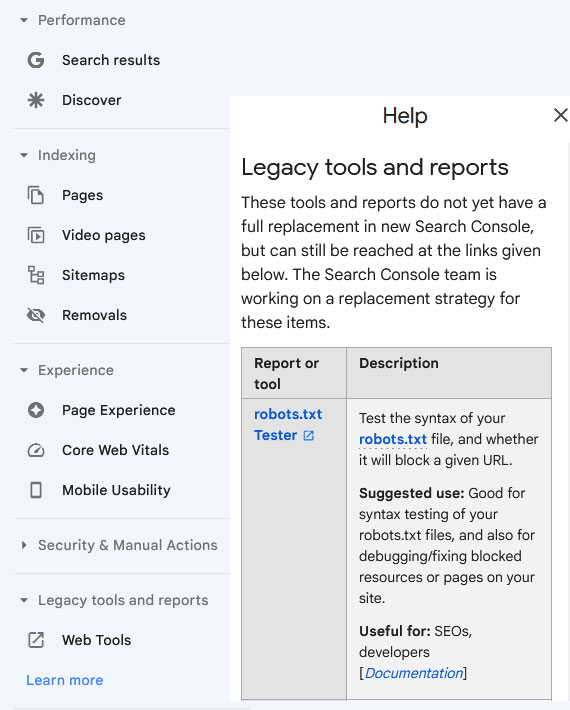
2. In the left-hand navigation menu, click on "Legacy tools and report" and then select "Learn more". Then click on "robots.txt Tester".
3. From the top navigation menu, select the website for which you want to check the robots.txt file. You can see that there are no problems with robots.txt file. You can check if certain URLs are allowed to be indexed by the search engine.
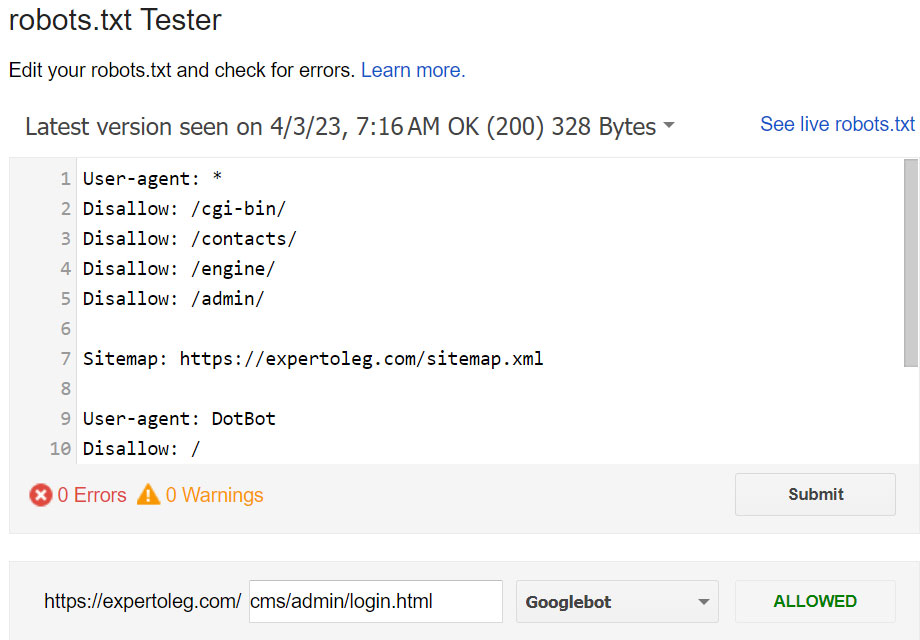
4. You can find that certain URLs are being blocked by the robots.txt file, you may need to adjust the file to allow crawlers to access those URLs.

5. By checking the robots.txt file in Google Search Console, you can identify any issues that might be preventing search engine crawlers from accessing your website's content.


Bing Webmaster Tools
Bing Webmaster Tools - Similar to Google Search Console, this tool allows webmasters to monitor their website's performance in Bing search results. It provides data on search queries, backlinks, and technical issues that may affect a website's search engine visibility.
To check the robots.txt file for your website in Bing Webmaster Tools, follow these steps:
1. Sign in to your Bing Webmaster Tools account and select the website that you want to check the robots.txt file for.
2. In the left-hand navigation menu, click on "Configure My Site" and then select "Robots.txt Tester".
3. Here, you can see the current robots.txt file for your website and any errors or warnings associated with it.
4. You can also test how Bing's crawler will interpret your robots.txt file by entering a URL in the "Test a specific URL" field and clicking the "Test" button.
5. If you need to make changes to your robots.txt file, you can do so by clicking on the "Edit" button.
By checking the robots.txt file in Bing Webmaster Tools, you can ensure that Bing's crawler is able to access the content on your website that you want indexed. If you find any errors or warnings in the robots.txt file, you may need to adjust it to ensure that Bing can crawl and index your website properly.
Yandex Webmaster
Yandex Webmaster - This tool is designed specifically for websites targeting the Russian market. It provides insights into a website's visibility in Yandex search results, as well as tools for optimizing its performance.
To check the robots.txt file for your website in Yandex Webmaster, follow these steps:
1. Sign in to your Yandex Webmaster account and select the website that you want to check the robots.txt file for.
2. In the left-hand navigation menu, click on "Tools" and then select "Robots.txt analysis".
3. Here, you can see the current robots.txt file for your website and any errors or warnings associated with it.


You can also select previous versions of the robots.txt file.

4. You can also test how Yandex's crawler will interpret your robots.txt file by entering a URL in the "Check if URLs are alowed" field and clicking the "Check" button.

By checking the robots.txt file in Yandex Webmaster, you can ensure that Yandex's crawler is able to access the content on your website that you want indexed. If you find any errors or warnings in the robots.txt file, you may need to adjust it to ensure that Yandex can crawl and index your website properly.