
How to Adjust Website Crawl Rate for Different Search Engines?
Google Search Console
If Google is making too many requests per second to your site and slowing down your server, you can limit how fast Google crawls your site.
First option
1. Sign in to your Google Search Console account and select the website that you want to limit the crawl rate.
2. In the left-hand navigation menu, click on "Legacy tools and report" and then select "Learn more". Then click on "Crawl rate settings".
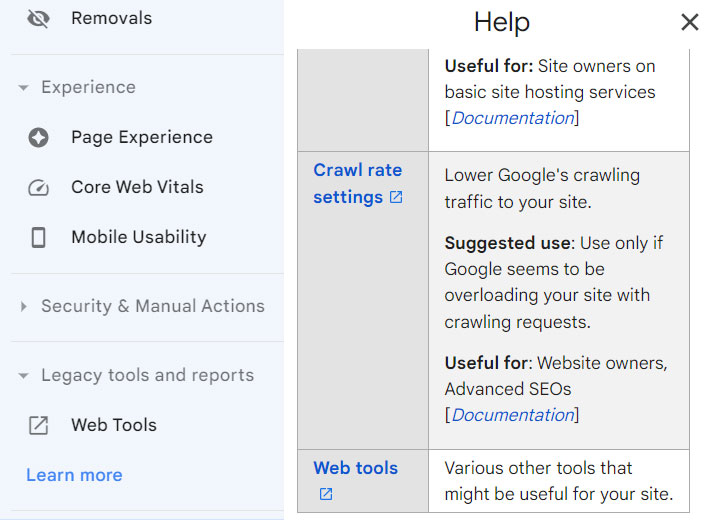
3. By default, Google sets the crawl rate to "Let Google optimize for my site (recommended)". However, if you want to set a custom crawl rate, select the "Limit Google's maximum crawl rate" option.


4. Use the slider to adjust the crawl rate. A faster crawl rate will allow Google to index your site more frequently, while a slower crawl rate will reduce the frequency of indexing.
5. Click on "Save" to save your changes.
6. Please note that the crawl rate will return to automatic after 90 days.
It's important to note that the crawl rate is just a suggestion to Google, and it may not always follow it. Google's algorithm will determine the frequency and depth of indexing based on various factors, including the popularity and relevance of your website, the frequency of updates, and the crawlability of your website.
Second option
If you're able to detect and respond to increased load dynamically, return HTTP 503/429 when you're nearing your serving limit. Be sure not to return 503 or 429 for more than two or three days, though, or it can signal Google to crawl your site less frequently in the long term.
Bing Webmaster Tools
1. Sign in to your Bing Webmaster Tools account and select the website.
2. In the left-hand navigation menu, click on "Configuration" and then select "Crawl Control".

3. By default, BingBot evenly crawls your site throughout the day.
4. You can choose the time zone. Drag anchor against each hour of the day to set maximum allowable crawl rate.

Yandex Webmaster
Yandex allows you to set the crawl rate and frequency of indexing using the "Crawl settings" feature in Yandex Webmaster. Here are the steps:
1. Log in to your Yandex Webmaster account and select the site you want to set the crawl rate for.
2. In the left-hand navigation menu, click on "Indexing" and then select "Crawl rate".
3. By default, Yandex sets the crawl rate to "Optimize automatically", but you can choose to set it to "Set manually".
4. You can adjust the crawl rate for sites on an individual basis if necessary. Change the crawl rate if the bot is sending too many requests and slowing down your server. You can choose the maximum scanning speed from 0.2 to 20 requests per second. These settings serve as a recommendation for the bot.

5. Once you have made the necessary changes, click on the "Save" button to save your settings.
It's important to note that Yandex may not always follow the crawl rate or indexing frequency that you set. Like other search engines, it uses its algorithm to determine the frequency and depth of indexing based on various factors, including the popularity and relevance of your website, the frequency of updates, and the crawlability of your website.
Yahoo
Yahoo doesn't have a specific setting to adjust the frequency of site indexing like Google Search Console, Bing Webmaster Tools or Yandex Webmaster.
Sogou
Sogou, a Chinese search engine, does not provide a specific feature for setting the frequency of site indexing.
Baidu
Baiduspider is the web crawler used by Baidu, the leading Chinese search engine. Like other search engines, Baiduspider automatically crawls and indexes web pages, and there is no specific feature for setting the frequency of site indexing.
HaoSou
HaoSouSpider is a web crawler used by the Chinese search engine, Haosou. Like other search engines, Haosou automatically crawls and indexes web pages, and there is no specific feature for setting the frequency of site indexing.
Daum
Daum Webmaster Tool is a web service provided by Daum, which is one of the largest online search and web portal companies in South Korea. It is designed to help webmasters optimize their websites for Daum's search engine and improve their site's visibility in Daum search results.
Daum search robot, also known as Daum Bot, doesn't have a specific setting for frequency of site indexing like Google and Bing. However, webmasters can use the Daum Webmaster Tool to manage their website's crawl rate and frequency of website updates.
To manage the crawl rate, log in to your Daum Webmaster Tool account and navigate to the "Crawl Settings" section. Here, you can set the crawl rate for your website to slow, medium, or fast.
To manage the frequency of website updates, make sure your website has a sitemap and submit it to Daum Webmaster Tool. The sitemap will provide Daum Bot with information about your website's content and structure, which can help it determine how often to crawl and index your site.
Additionally, it's important to ensure that your website's content is regularly updated and high-quality, as this can also encourage Daum Bot to crawl and index your site more frequently.